For anyone needing a deep variety and source for royalty free stock photography, try out stock.xchng!
Archive for January, 2011
27 Jan
3 might not have been the charm
3rd class
Recap:
Tuesday’s class was still a little bit of feeling out in exactly what is wanted of us, and what we think of it.
Class started with a TED video hosted by the kids across the hall.
The video brought up some very cool and vaguely creepy ideas about where usability might be headed for something like a map application. I’m not so sure that I would like to be in a store somewhere and have someone call me saying that they were watching me pick out toilet paper at target. I’m not sure how much use the app has if you need someone with a camera and GPS in order for the live video functions and things to work. It’s a good idea, but I remain skeptical- and not just because I heart google maps
Critique:
We also had a critique of our personas and Ipad app wireframe first drafts. Some of the personas were very creative and informational. The image below is a screen shot of mine.

There was a wide range of ideas and approaches in the wireframes. I kinda got the feeling that a lot of us were not exactly sure what the assignment should look like, but through that helpful critique, I for one feel like I have a much better handle on it. Here’s a sneak peek of one of my revised wireframes.
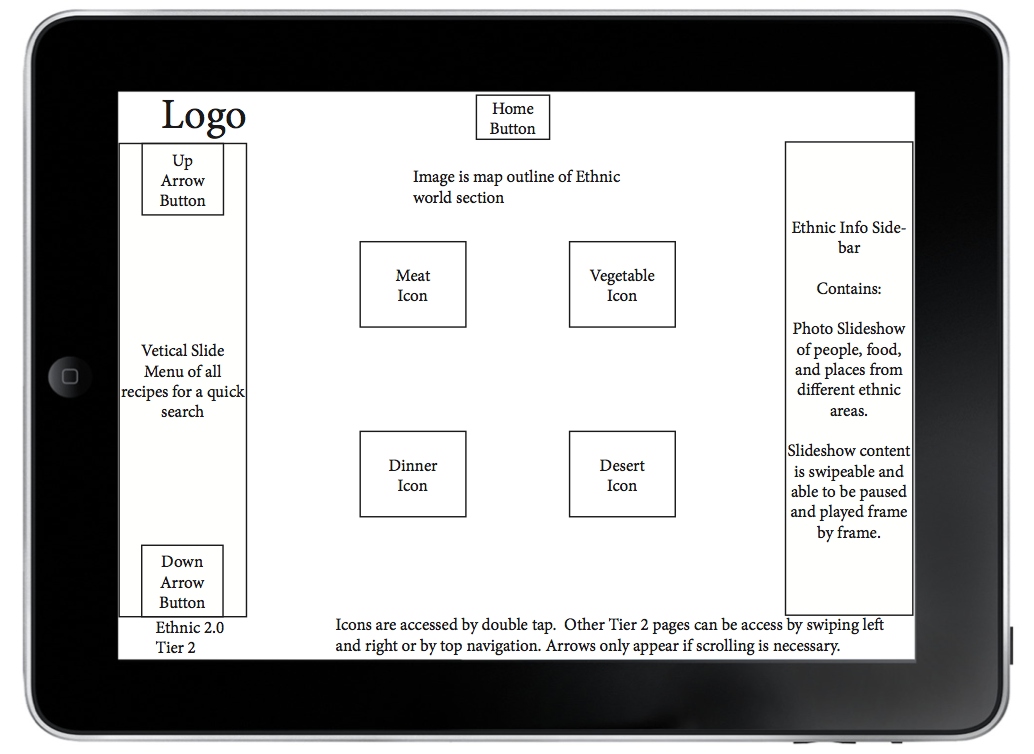
I know that Maggie’s gonna say I told you so, but researching the apps and watching the videos of people playing with them kinda makes me want an Ipad. I had better stay out of the Apple store.
Journals:
We all had a chance to share what he had done so far for our usability journals, amazingly enough for a web class, no one has yet to bring in a journal entry on a website. I’m sure however that will change. In fact I would bet money on it. You should bet money on it as well. I’m not kidding, call Vegas, find out what the line is- I’ll wait….
Okay, enough waiting. If you were smart enough to follow my advice, you just won a boatload (I only want 10% for the tip-off). My journal entry for this coming week is probably the most horribly amazing website that I’ve ever seen. The screenshot does not do it justice, follow the link and get ready to go insane in the membrane- insane in the brain.

Screen shot of Hosanna1.com website
http://hosanna1.com/
I have no clue what this site is for, or how to navigate it. I would be scared to meet the person that could actually figure it out. A friend sent it to me and the designer in me figuratively threw up on the floor while the rest of me was on that same floor laughing my ass off. You can randomly click around the site to get to other almost as horrifying sites. There is so much wrong with this that I’m not even sure where to begin- lack of navigation, no pathways that the eye can easily follow, a giant Afghan hound with angel wings, or the “we love smoking and don’t heart immigrants” banner. The disconcerting snowflakes that wander down through the screen definitely do not help matters.
Lecture Fun!!
Eye-tracking:
While Liina was talking about the concepts that we are reading about in the texts and introducing one of the mini-assignments for tomorrow she played a couple of eye-tracking Youtube videos that I thought were extremely cool.


Screen captures of youtube videos: Eye Tracking Demo, Eye Tracking video of a User using the IKEA Website
http://www.youtube.com/watch?v=lo_a2cfBUGc&feature=related
http://www.youtube.com/watch?v=xKdOMgu0C5Q&feature=related
F-Pattern:
She also showed us an F-Pattern heat test image that shows thermally what the user spent the most time looking at. It’s funny how the eye never even made it over to the adds on the right side of the screen. It’s like reverse Pavlovian training- we hear the bell and look away.
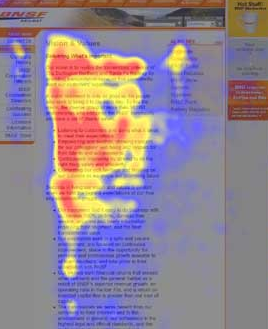
Screen shot from useit.com
Hierarchy:
We learned that hierarchy is all around us- much more than some of us want. The definition of hierarchy is: a system or organization in which people, groups, or things are ranked one above the other according to status or authority.
There are many examples of hierarchies. Some, (like the one headed by the guy below) have absolutely no bearing on web design.

Image from BBC.UK.com
Other “web-based” examples of hierarchy are:
Things that pop out at you-

Altered image of clip art fist
Things that are logically placed-

Image from bigstockphoto.com
And things that are nested-

Image from ornithology.com
Conventions:
(Not the kind that middle-aged boat salesmen go to)
Conventions are things that are the ways in which something is usually done. In other words buttons are expected to look like buttons.

Image from wpromote.com
Remember to make it obvious!!
Assignment
(Happy Happy! Joy Joy!!)
Journal- keep find the things you love or loath. We desperately want to know why!
Revise your wireframes and personas
Read: Unger/Chandler- Chapters 10 & 11, Krug- Chapters 2 & 3, and Saffer- Chapter 1
Study for the quiz
Test out 5 IPad apps and find 5 examples of hierarchy and 10 examples of convention
Have fun with all of it
Life Shattering Impactful Conclusion
Other than learning that life is moving way to fast for an old man like me, that you can now get live creeped on by someone trying to find the nearest Aldi’s, and that there are way to many peaking orders for the good of me- there was not a whole lot that inspired me in this particular class. I have learned that design work seems to be a lot less about my brilliant ideas than about what people actually want. Research is word of the day. See- it says so below.
Word of the day: Research
26 Jan
Ipad Templates!
Here is a great site for ipad templates and many more!
http://speckyboy.com/2010/09/01/illustrator-template-toolbox-for-web-mobile-and-app-developers/
24 Jan
Our second class.
Hello Principles of Usability students!
Our second class of the semester was a success.
To review: we took our quiz on the first few reading chapters (I am happy to report that we all did fairly well on these!), we shared the contents of our binders (an item that we would like to alter and make better), we shared our task flows, and we used class time to work on the upcoming assignment for the Visual Cookbook iPad App.
Honestly, I wasn’t even sure what an iPad app looks like! However, our class did a bit of googling and came up with some great answers.

This image is from the Wall Street Journal website and it shows the iPad App for the Wall Street Journal. I like this example because it is cleanly designed with a nice level off professionalism while still remaining creatively interactive. Apps for iPads seem to be very interactive and informative. This is an important thing to note as we prepare to design our Visual Cookbook apps.
Looking at each others task flow charts was one of the most interesting parts of class.
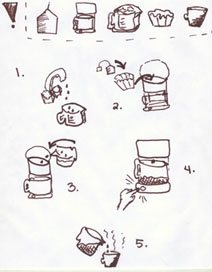
^ This is a scanned image of my own task flow chart for making tea in a coffee pot.
We will be using these task flow charts to create our Visual Cookbook iPad apps. In the post from Liina below, there is an excellent link to an iPad app design template. I took a look at some of the feedback and it sounds like a great thing to download! If you’re feeling adventurous, you should try it!

^ the image above comes this website.
Personas: are an important part of user-centered design. A persona answers viewers questions, gives you more credibility, and can make you more or less appealing. The smallest little thing (see the image below!) can make you loose or gain credibility.

^ the link above comes from grokdotcom.com
T H E A S S I G N M E N T
For next class we need to create three personas showing the different demographics for your app. Who are you targeting?
It is a good idea to document all of your research!
Next, we need to build three sets of wireframes for the pages of our app. This should include three versions of the homepage, three versions of the categories, and three versions of your recipe pages.
All of these can be sketches at this point but we’ll also need to create visual examples in Illustrator or inDesign.
And finally,

This scanned image from my notes reminds us … “No over-complication. Simple is fine.”
21 Jan
iPad PSD Template Download
A good set of tools to help you get started once we get into design.
http://www.teehanlax.com/blog/2010/02/01/ipad-gui-psd/

Thanks http://www.teehanlax.co!
21 Jan
Annie’D

I am 23 years of age. I spent the first 18 years of life in Wauwatosa, WI.
I have been in St. Paul for the last 4 years and would rather eat mouse droppings than move back to Wisconsin.
I have been to three other colleges, lived in three different states and 13 different residences (in the past 5 years). I am constantly seeking a maximum level of joy through occupation, education and living space.
After working full time in the Target Deli for a year during a hiatus from college, I decided that every venue of education had been disappointing because what I really wanted to do was go to art school. I have always been creative and I have always loved to put things together. In high school, I put together a whole portfolio in an independent study art class. I opted out of art school because I though I was too smart (really I was too scared). When I applied to CVA, everything fell into place and just felt right. Honestly I just liked how much it didn’t feel like college. I really like it here. I still don’t know what I want to do with my life, something with design. Most of the time I feel like I am missing a vital piece of the design puzzle but I have the zeal to continue trudging along. I have come to accept that I don’t know way more than I do know and that is ok.
I am a certifiable facebook creeper. I obsess over design blogs. I am easily the most addicted netflix user there is.
However, I love yoga, eating with friends and am an accomplished mover and shaker.
20 Jan
Christinaaaa

Tis moi.
I am 21 years of age.
I spent most of my childhood living in North Branch, MN and then migrated to Forest Lake, MN and resided there during my freshman and sophomore years of college. I just recently moved to Uptown in Minneapolis and will remain there for a questionable amount of time longer.
I have always loved art.
I took a photoshop class in high school and knew digital art was what I wanted to do with the rest of my life – careerwise.
I toured MCAD and CVA and knew right away that CVA was the right choice for me.
Things that I enjoy doing online are :
researching government conspiracies, finding evidence of the existence of aliens, and discovering new, awesome muzack.
Things I thoroughly enjoy doing offline are :
making music, going to sick dubstep shows, and reading.
20 Jan
Our Very First Class.
Our first Principles of Usability class started with introductions. First we were introduced to the Syllabus. Don’t forget about the quiz every Thursday! Then some of us were reminded that we weren’t quite done paying for the semester we still had to purchase some books, a 1” three ring binder, post its, and some pens.
If you haven’t had a chance to get your books I found some quite cheap on Amazon…


After leaning about the class and each other we had to tell the WORLD! We created our first blog post. We had a little trouble with the blogging website, maybe it could have been a little more user friendly. And that brings me to our first discussion. Since the title of the class is Principles of Usability we talked a little about what the meaning of usability is. This brought up the user and how one may interact with designs. It should be easy for the user to navigate through a website or to follow directions. It is what creates good design. For example, I was wandering around Target between classes for a few grocery’s and it was not till I left that I noticed how easily I found everything. Maybe I didn’t notice because I was on the phone the whole time and trying to remember what coupons I had. So I guess that’s what its designed for, you can be careless and shop with ease.

We then chose a few items that we felt could be designed better- such as remote controls and gas pumps. The group that chose the gas pump said it was hard to handle, sometimes confusing, and could be made more convenient for the customer.

20 Jan
Kyle Zimmerman


Name: Kyle Dennis Zimmerman
Age: 21 soon to be 22
Bio: I hail from a small town in central MN called Royalton. I spent my entire childhood and adolescence there and graduated from Royalton High School in 2007. I then went to The U of M in Morris MN. I spent one year there and decided that it was not for me. I then attended Central Lakes College in Brainard MN. Another year passed and I decided to take on the finical burden myself and applied to CVA. Got accepted and started in the Fall of 2009. I live in on the West side of Saint Paul. I work at Journeys in the Rosedale Mall as of this year. In my free time I watch movies and play video games. Yep, thats about it.
Three online things I use: Email, Facebook, and Netflix
Three offline things I use: iPod, phone, and bed
Three things I interacted with today: Toilet, Car, and Doors


 Principles of Usability