Welcome back from Spring Break with another edition of Ted Tuesday. This week featured the words of Rogier van der Heide speaking on the functions and concerns of light in our lives and the importance of the interplay between light and darkness.
The comparison of sunlight to artificial lighting is of particular intrigue as you consider how artificial lighting constrains, forces, and unifies the world we have created for ourselves. There was a time, after all, when people lived and worked by the cycles of the sun – at sunset your work was over for the day. And yet now we take our artificial lighting with us everywhere, extending our days as long as possible into the night until fatigue forces us to sleep (or just to drink more caffeine). In this sense light becomes seen as a source of productive hours rather than health and healing.
James Turrell was brought up in the following discussion as an artist whose work focuses on light as it pierces through darkness.
James Turrell. Roden Crater.
James Turrell. Sky Pesher. Walker Art Museum.
His open spaces bring a sense of peace and meditation when the viewer sits in the dark to experience and focus on the light that extends inward. But it is the duality of existence between light and dark that makes this calm possible – alone darkness can bring tension and anxiety of the unknown, and the over-stimulation of light (especially artificial light) can be harsh and wearying after extended hours.
It reminds me of a coworker who once complained about the fluorescent lights required in her basement level office until she was able to replace them with a softer, more ambient lamp. Her daily headaches have stopped, and her office really is now the nicest in the building.
Onwards Towards New Projects
As always, though, class moves on, and since we wrapped up the team design projects before break, it was time to dig into a new topic. The project this time: design a website. And remember:
The user is your guide.
and
The content is the focus.
Each of us was to choose any topic for a site that we felt well versed in explaining and exploring. What are your hobbies? Your interests? What do you want to spend your time talking about?
After a good deal of frustrating brain wracking, I ended up choosing jewelry design – a site focused on providing information, advice, and interaction to potential jewelry designers looking to begin selling their work out in the world. As a jewelry buyer for a retail store, I’ve seen a lot of amazing work:
as well as a lot of not so great work and designers with really bad price points, technical skills, and selling abilities. So let’s make a site to give people some of that quick user guide info up front! Or just some inspiration and awareness as to who the competition is out there.
But There’s Always a Twist
In the real world, you don’t usually get to design for yourself. So partner up and trade sites. Each of us is now a client – and my jewelry site is now in Annie’s capable designer hands. I provide her the content and information on the topic, and she makes the whole thing look gorgeous.
So What’s Next?
We whipped up content outlines for our designers in class (hopefully), so each designer needs a working site map ready for Thursday.
And review UX chapter 6 as we’ll be needing user research options too.
This time through, the weekly Thursday quiz will feature the only the Krug book: chapters 10, 11, and 12.
And a very special guest speaker for the night – Nick Zdon – so have your questions ready!
Tuesday’s always bring a fresh TED talk featuring interesting “ideas worth spreading”. This week’s TED talk, featuring Seth Godin, was especially applicable. Godin spent a large majority of his “talk” being our tour guide to “broken things” and making them unbroken. He pointed out humorous and often poorly designed public service announcements and warning signs. He also points out seven reasons that he believes the designs don’t work. I liked his third point which was that the design could be broken because things changed in between the time it was designed and the time the design got used. Our world (particularly where technology is concerned!) is fast paced and it can be a struggle to keep up. Designs should be made to last. Godin’s energy and enthusiasm was refreshing and I found myself wishing his talk was a bit longer – which would have also given him time to explain more fixes for broken things. In my google searching, I found that on Seth’s Blog he wrote,
“I did this talk about three years ago. I have to admit that very little in the way of progress has occurred.”
Well, I suppose it might finally be time to change this.
This TED talk was worth the second viewing and I would highly suggest that if you liked it the first time, you give it a second go. His list of seven reasons why the designs don’t work are good to remember.
Additionally, the website that Seth Godin mentions gives even more examples of poor design. Ironically, the design of the website isn’t totally appealing and comes off a bit boring.
However, I do recommend the content for its entertainment value as well as more of Godin’s unique talking/writing style. In viewing this website, I also realized that it functions much like the journaling work we’ve been doing with designs that are working and not working. For example, one person wrote in to criticize the design of the Chevy Impala’s AC design.
“At night, this is very readable and easy to see. However, during the day, the blue LED is very hard to find in all the chrome reflections – it takes a concentrated effort to tell where the dial is pointed.” – Doug Shaefer
ARE YOU INDISPENSIBLE?
I also looked a bit further into Seth Godin’s work and found that he wrote a book called “Linchpin: Are you Indispensable?”
The description of the book says that it is more than a how-to, but rather that it pushes you to see things differently and make changes. Godin said about this book:
“a linchpin is the essential element, the person who holds part of the operation together. Without the linchpin, the thing falls apart.”
Not so surprisingly, this got me thinking about the UX Design Team Projects that we are currently working on. I don’t mean to get sappy or sentimental, but I think it is important to remind ourselves that we are each a linchpin in this project. Each one of us has a distinct role in the assignment and we are not as interchangeable as we may seem. Group projects can often be stressful and cause us to crave a temporary coma allowing us a grace period in which we don’t have to complete the assignment and can leave our group members to do it. That being said, the group presentations this week of the work done so far showed some excellent ideas and a really interesting dynamic in each group that I’m excited to keep up with.
IN CLOSING
Phase two of our UX Design Team project is upon us which means task flows, wireframes, and design brainstorming are all due. Thank goodness we already know how to do these things. Good luck to everyone !
We started off class by helping Jesse get on the server and also going over the first assignment. There were good points mostly and some bad points but over all we did a briliant job at showing our understanding of usability. Go Team! 😀
After we talked about the first assignment we got on the topic of our second assignment which was to choose an interface and how to design it better. Some, but not all of the ideas we came up with were;
-ATM machines
gas pumps
-Grocery self-check outs
-Key Fobs
-Gas Station coffee makers
Automattic car washes
and so on and so forth
After we brain stormed as a class we were put into teams of three and set off to come up with what we were going to re-design. In the group of three there is a Project Leader, an Information Architect, and a Design Lead.
We then discussed the Bare Honey Update. We all helped out with the “b” problem. It was either to serious or hard to tell that it was a “b”. Some of us came up to the board and doodled our ideas of what could help solve the problem.
After that we watched a video about a company called IDEO
We wrapped class up by getting back in our groups for a little more discussion how to re-design the interfaces we choose.
If you’re going to have the conflict of a night class the same night as a design event opening, it’s certainly of great fortune to have that class also be a design class, along with the benefit of a teacher who supports the attendance of said event. Which of course is what resulted in our Feb. 17th class starting out at the Paul Rand Brands opening at the CVA gallery.
So with a slightly restructured class on hand, we spent most of the evening exploring the featured work and the legacy of Paul Rand – first through the gallery exhibit, then through a few short videos Liina presented back in class, and wrapping fully around with each of us whipping out a quick reaction paper to the event. Because, really, experiencing a great seasoned designer’s work and advice does come down to how each person individually interacts with that work. In that, it was quite pleasant to show up a bit earlier than scheduled simply to absorb and internalize what resonated with just me and my needs and reactions. As such, here’s a few of the pieces I found of particular draw:
Obviously, there’s the appeal, amusement, and natural nostalgia of the vintage style – even down to the actual products and the aged and faded papers of original display purposes. But Rand, as are all of us, was also subject to his own time and influences. Thus, what we experience and learn from his work should go beyond the playful vintage aesthetic – it wasn’t vintage to Rand, after all.
For example, I recall hearing that even within the huge variety of Rand’s designs and varying clients, there are only a scant few fonts he ever used. Logical of course, given the lack of digital output of the time, but still, in our time of an explosion of typography ad choices due to digital output, it could serve well to remember that more isn’t always better or as effective.
Also, as an aside and to prove myself as a child of the technological world – can you possibly imagine not having digital? What would people even do with themselves?
Video Extras
But to wrap up on the Rand, here’s the short clips Liina showed in class. As points for the digital side, there’s an immense collection available for easy picking on YouTube, but let’s focus on the class results for now, shall we?
On to Class Time and Quizzes
Beyond Rand, it was still Thursday, and, exhibit or not, it was still quiz night. But quiz night this time with an added twist featuring a question beyond multiple choice on providing an example – with back up reasoning – on how a company’s design strategy fits with its business strategy. How’s that for added application of reading topics rather than simple passive absorption?
Plus a Journal Check-In
Still, answers were all in good humor – a gallery opening apparently has the power to add a little relaxation and good playful humor into late night studies. And that ease of mind carried nicely over into journal checks; you have to appreciate rolling with the flow, after all, and it lends to a much more entertaining discovery of the good and bad explorations of usability applications.
From PearlBrite’s bouncing navigation and hypnotic music,
to the MN Unemployment Department’s completely unreadable purposes,
and the Catholic Church’s new Confession App available for only $1.99,
there’s always room for usability evaluation.
Moving Forward…
Oh, and let’s not forget that next Tuesday is the big due date that’s been creeping up on us. Whether you’re feeling under control or are shooting for that last minute panic push, just don’t forget any pieces at home Tuesday night! For those keeping lists – because why wouldn’t you keep a list? Life feels better when you get to cross them off! – the pieces to consider include:
-mounted Personas
-mounted Wireframes
-mounted Mood Board (or two)
-mounted Design Boards (minimum of three screens)
-research documentation
prepared PSD and JEPG files for the server
As usual, this Tuesday was TED Tuesday where we were graced with the presence of the class across the hall. They came to our room (which was nice because we were already comfy in our seats) to watch this weeks edition, “Jason Fried: Why work doesn’t happen at work.”
This was a particularly interesting video in my opinion because many of the work related interruption and management problems which are things that we as students have a lot of experience with. Although a lot of our classes are over two hours long, we don’t often have in class work time. And like the workers described in the video…. we are “banned” from checking Facebook or Twitter. Another thing I found fun was that my mother is one of those “manager/overlord” of the office types who schedules mandatory meetings for 20 people or more every 30 seconds. I sent this to her Tuesday night, she still hasn’t responded. Oops!
Critique of our final Wireframes & Personas-
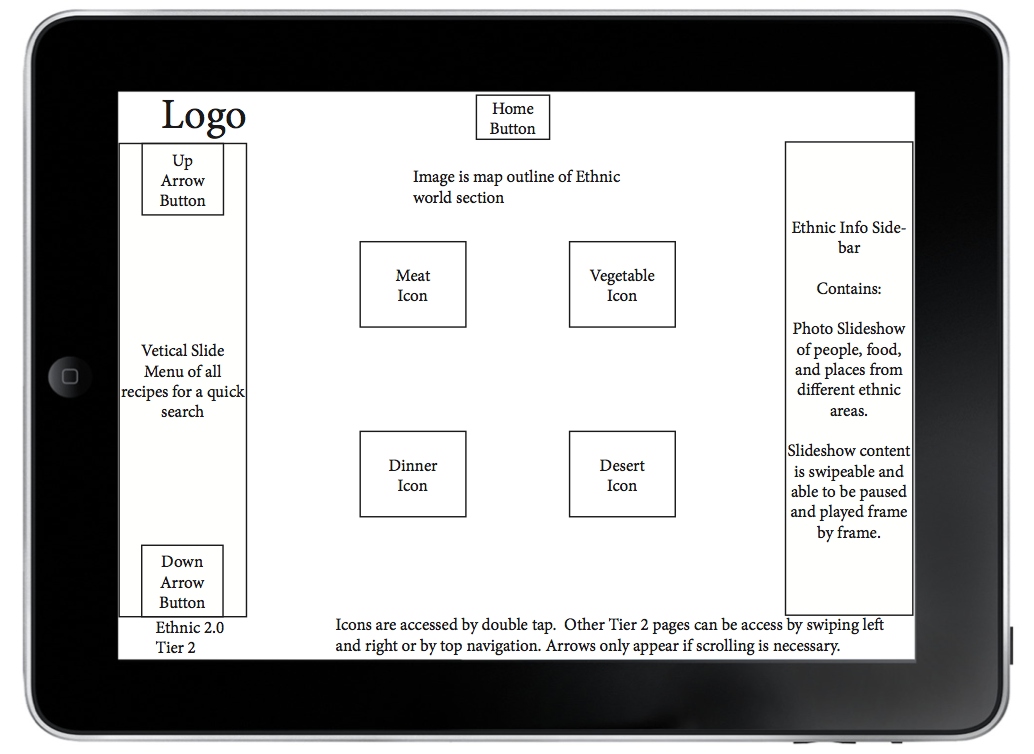
For class we were to come prepared with our final mounted wireframes and personas for our iPad app. They were to be 11″ x 17″ sheets with three images on them mounted flush to the edge on foam core board. Craft was extremely important, although there is an opportunity to do some final touch-ups to your work before its due. Here is an example of my final personas and wireframes mounted.
Final Wireframe
Final Personas
These wireframes and personas do NOT need to be printed in color. However the next assignment that I will talk about later will need to be eventually shown with color. Everyone received credit for these if they had them in class to show!
Journals-
The journals Tuesday were fun to see because we got an unexpected comparison of jewelry web sites. It was good to see the pros and cons of each site. Unfortunately I did not have a journal to show the class Tuesday but we got into a nice but brief discussion of the Adobe Creative Suite and why and what we do or do not like about it. It was good to finally be able to talk about the things that we didn’t get to cover (for some of us younger folk) in Foundation year at CVA. Only 96 more to go!
Lecture:
Setting the mood for a Mood Board-
Going from the Defining your problem stage into the Designing your solution stage, we will be creating a mood board. A mood board is exactly how it sounds. It will set the tone and the appearance of what you want your design to look like. You can add inspirational color palettes, illustrations, patterns, textures and typography to your board. This will bring all your personas to life.
How to get started:
Get reacquainted with your personas. Put yourself in their shoes. What do you think they would be attracted to visually?
Explore images, styles, patterns, textures, illustrations, color palettes, type styles etc.
Here are some questions you might consider asking yourself while creating your mood board…
Come to class prepared with your preliminary mood board. It doesn’t have to be printed out, but you should have a file to put up on the server that is clearly organized and includes all of the assignment requirements. As mentioned earlier, these include: color palette, pattern and or texture examples, images, typography examples, and any other inspirations you come across. The file should be formatted to 11″ x 17″ horizontally, as if you were planning to print it out.
In wrapping up this post, I hope that everything described was clear. I have never blogged before so fingers crossed! Good luck and its almost THE WEEKEND!!!!!!!!!!!
In class the first topic of discussion was the process a person should go through in order to have a good out come come for his or her project. We began by watching some videos of the process that taught the class first to not hyper focus on the hompage and second most clients are crazy but the designer still has to please them.
The process a person should go through is:
Define
Audience is the main objective
It should have content, deadlines
Than comes the creative brief
Than the overall concept
DESIGNERS HAVE TO REMIND CLINETS OF THE DEFINING STEP QUITE OFTEN
Design
Themes
concept
colors
Develop
Deliver
SITE MAPPING
Site mapping was the second topic of discussion that was discussed. In the end a person’s site map should look something like this
Tuesday’s class was still a little bit of feeling out in exactly what is wanted of us, and what we think of it.
Class started with a TED video hosted by the kids across the hall.
The video brought up some very cool and vaguely creepy ideas about where usability might be headed for something like a map application. I’m not so sure that I would like to be in a store somewhere and have someone call me saying that they were watching me pick out toilet paper at target. I’m not sure how much use the app has if you need someone with a camera and GPS in order for the live video functions and things to work. It’s a good idea, but I remain skeptical- and not just because I heart google maps
Critique:
We also had a critique of our personas and Ipad app wireframe first drafts. Some of the personas were very creative and informational. The image below is a screen shot of mine.
There was a wide range of ideas and approaches in the wireframes. I kinda got the feeling that a lot of us were not exactly sure what the assignment should look like, but through that helpful critique, I for one feel like I have a much better handle on it. Here’s a sneak peek of one of my revised wireframes.
I know that Maggie’s gonna say I told you so, but researching the apps and watching the videos of people playing with them kinda makes me want an Ipad. I had better stay out of the Apple store.
Journals:
We all had a chance to share what he had done so far for our usability journals, amazingly enough for a web class, no one has yet to bring in a journal entry on a website. I’m sure however that will change. In fact I would bet money on it. You should bet money on it as well. I’m not kidding, call Vegas, find out what the line is- I’ll wait….
Okay, enough waiting. If you were smart enough to follow my advice, you just won a boatload (I only want 10% for the tip-off). My journal entry for this coming week is probably the most horribly amazing website that I’ve ever seen. The screenshot does not do it justice, follow the link and get ready to go insane in the membrane- insane in the brain.
Screen shot of Hosanna1.com website
http://hosanna1.com/
I have no clue what this site is for, or how to navigate it. I would be scared to meet the person that could actually figure it out. A friend sent it to me and the designer in me figuratively threw up on the floor while the rest of me was on that same floor laughing my ass off. You can randomly click around the site to get to other almost as horrifying sites. There is so much wrong with this that I’m not even sure where to begin- lack of navigation, no pathways that the eye can easily follow, a giant Afghan hound with angel wings, or the “we love smoking and don’t heart immigrants” banner. The disconcerting snowflakes that wander down through the screen definitely do not help matters.
Lecture Fun!!
Eye-tracking:
While Liina was talking about the concepts that we are reading about in the texts and introducing one of the mini-assignments for tomorrow she played a couple of eye-tracking Youtube videos that I thought were extremely cool.
Screen captures of youtube videos: Eye Tracking Demo, Eye Tracking video of a User using the IKEA Website
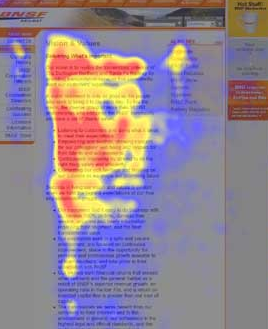
She also showed us an F-Pattern heat test image that shows thermally what the user spent the most time looking at. It’s funny how the eye never even made it over to the adds on the right side of the screen. It’s like reverse Pavlovian training- we hear the bell and look away.
Screen shot from useit.com
Hierarchy:
We learned that hierarchy is all around us- much more than some of us want. The definition of hierarchy is: a system or organization in which people, groups, or things are ranked one above the other according to status or authority.
There are many examples of hierarchies. Some, (like the one headed by the guy below) have absolutely no bearing on web design.
Image from BBC.UK.com
Other “web-based” examples of hierarchy are:
Things that pop out at you-
Altered image of clip art fist
Things that are logically placed-
Image from bigstockphoto.com
And things that are nested-
Image from ornithology.com
Conventions:
(Not the kind that middle-aged boat salesmen go to)
Conventions are things that are the ways in which something is usually done. In other words buttons are expected to look like buttons.
Image from wpromote.com
Remember to make it obvious!!
Assignment
(Happy Happy! Joy Joy!!)
Journal- keep find the things you love or loath. We desperately want to know why!
Test out 5 IPad apps and find 5 examples of hierarchy and 10 examples of convention
Have fun with all of it
Life Shattering Impactful Conclusion
Other than learning that life is moving way to fast for an old man like me, that you can now get live creeped on by someone trying to find the nearest Aldi’s, and that there are way to many peaking orders for the good of me- there was not a whole lot that inspired me in this particular class. I have learned that design work seems to be a lot less about my brilliant ideas than about what people actually want. Research is word of the day. See- it says so below.
Our first Principles of Usability class started with introductions. First we were introduced to the Syllabus. Don’t forget about the quiz every Thursday! Then some of us were reminded that we weren’t quite done paying for the semester we still had to purchase some books, a 1” three ring binder, post its, and some pens.
If you haven’t had a chance to get your books I found some quite cheap on Amazon…
After leaning about the class and each other we had to tell the WORLD! We created our first blog post. We had a little trouble with the blogging website, maybe it could have been a little more user friendly. And that brings me to our first discussion. Since the title of the class is Principles of Usability we talked a little about what the meaning of usability is. This brought up the user and how one may interact with designs. It should be easy for the user to navigate through a website or to follow directions. It is what creates good design. For example, I was wandering around Target between classes for a few grocery’s and it was not till I left that I noticed how easily I found everything. Maybe I didn’t notice because I was on the phone the whole time and trying to remember what coupons I had. So I guess that’s what its designed for, you can be careless and shop with ease.
We then chose a few items that we felt could be designed better- such as remote controls and gas pumps. The group that chose the gas pump said it was hard to handle, sometimes confusing, and could be made more convenient for the customer.
Name Origin: My real name is Chole, named after coal, since it’s used to heat up metal for sculpting molds. My mom named both me and my twin after art elements that relate to my dads profession. I just don’t like it, so I go by Claudia.
Home town/current location: North Minneapolis
Online activities: Facebook, youtube, and tumblr
Offline activities: Biking, cooking, sleeping
Bio: Grew up with art, loved art, wanted to do art for a living. My father John Poole does sculpture, mother Nancy Poole dabbles in the arts but has a different profession. Twin sibling Smyth, older sister Cassie, both do non-art related majors. Went to F.A.I.R., liked the media art classes. High schools I attended were Patrick Henry and Main Street School of Preforming Arts. Toured colleges (MCAD, CVA, AI) and fell inlove with CVA. I love designs on shoe boxes, wrapping paper, wall papers, and decorative elements to packages or company identities.
3 Useful items I interacted with today: Chrome Bag (affectionally called Phillip), bus card, and my planner.








 Principles of Usability
